What is it?
Stenojot is a Mac app that listens while you talk, writes both sides of a conversation down, and then keeps working on what was said. Notes sit in the transcript. A language model on the same machine pulls action items out of a finished stretch, writes a summary of the day, and answers questions about a selection or about the whole day.
It is a Mac app for Apple Silicon, macOS 14 or later. Speech goes through NVIDIA Parakeet. Questions, action items, and summaries go through an MLX language model you download once. Transcripts, notes, and those model replies live in a SQLite database under Application Support. Nothing in that path is uploaded.
The name is steno and jot. Steno is shorthand for writing down what was said. Jot is the note that stays with it.
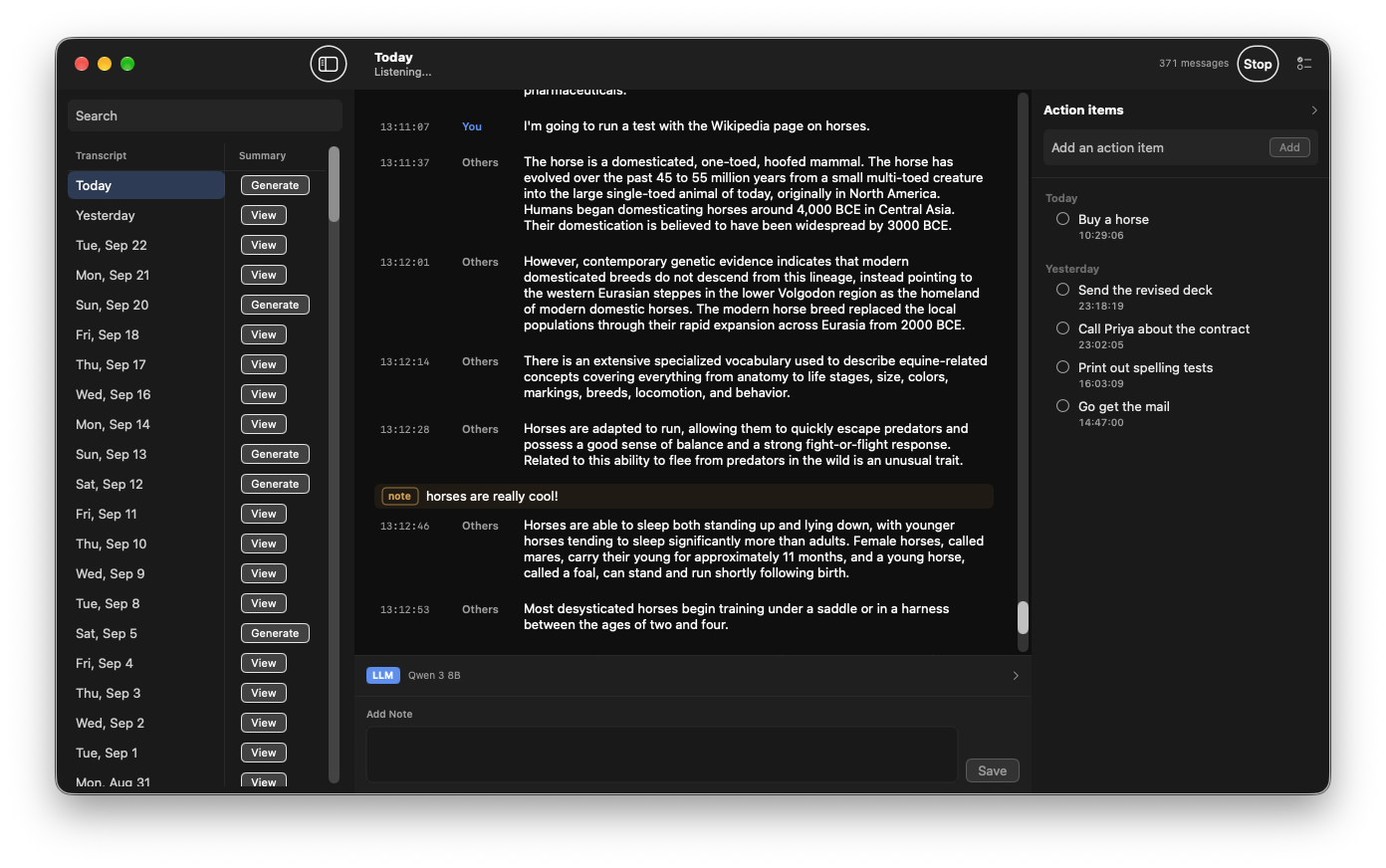
You can download a build, read the shorter product page at camhenlin.github.io/Stenojot, or clone the source at github.com/CamHenlin/Stenojot.
Why this exists
I wanted a transcription tool that stayed on the computer and was still useful after the words were written down. The local tools I tried could turn speech into text, and then they stopped. I wanted one app that could do all of this:
- Transcribe a conversation well, including both sides of a call
- Force replacements, so names, terms, and recurring mistakes come out the way I want
- Annotate the transcript as it happens, and keep those notes with the text
- Use a local language model to pull action items out of what was said
- Use a local language model to write a summary of the day
- Ask that same model questions about part of a transcript, or about the whole day
Nothing I found did all of that together, so I built it. The first version was a tool for me. By the time the database had hundreds of thousands of lines in it, the shape of the tool had changed, and the way it was built had to change with it.
What it was first
The first commit is March 13, 2026. The app was called Parakeet Transcriber, and it was two programs.
A Python sidecar captured 16 kHz mono audio from the default microphone with sounddevice, ran an energy-based voice detector, and transcribed a segment with parakeet-mlx once the room had been quiet for about 600 ms. A Node process received newline-delimited JSON and inserted each line into SQLite. A separate Express server served a Vue page, in one HTML file, that polled the database every two seconds. You ran npm start to listen and npm run serve to read. Notes lived between lines. Search lived in the browser.
That was enough to use every day. Over the spring and summer the page grew the things the transcript was missing: find-and-replace rules applied before a line was saved, and a chat panel that talked to a local Ollama server. The speech model stayed in Python. The language model stayed in another program on localhost. The viewer stayed a web page looking at a file.
By September that split was the problem. Launching the tool meant launching the listener and the viewer. The “all messages” view beachballed once the table was large. Ollama had to be running before a question meant anything. And the microphone was still one stream, so a call was a single column of text with no idea who had said it.
On September 23 I threw out the web app and started over as a native Mac app, with one constraint written down first: the SQLite schema stays compatible, so the database I already had can be imported. The next day the app stopped being named after the speech model. Parakeet is the checkpoint. Stenojot is the note.
What we did not build
A few shortcuts were tempting and would have produced a worse app.
A cloud transcription API. The point of the project is that the words stay on the machine. Parakeet runs on the Apple GPU through MLX. The language model does too. The database never leaves Application Support.
A speaker-identification model. “You” and “Others” are not inferred from voice. They are two captures. The microphone is the person at the computer. System audio is everyone else on the call. Labeling is a routing problem, not a diarization problem.
A swap to a newer speech checkpoint just because the number on a leaderboard moved. Parakeet TDT 0.6B v2 is the English model the sidecar already loads, published at 6.05% average word error rate on the Open ASR Leaderboard. Parakeet Ultra is a stronger checkpoint of a later Parakeet, and it runs in Moondream’s Photon engine on an NVIDIA GPU. The weights are not an MLX config.json plus model.safetensors. Loading them would have meant replacing parakeet-mlx and leaving Apple Silicon for the one model in the app that has to keep up with a live call. The Apple Silicon sibling, Parakeet Redux, is a compressed multilingual checkpoint. The meetings this app transcribes are English. v2 stayed.
Ollama as a required second app. The chat path was already “send a system string and a user string, stream the tokens back.” That does not need a server. It needs a runtime inside the process. An older config.json may still contain an ollama block. The app keeps the block when it saves, and runs the in-process model instead.
The shape of the Mac app
Launching Stenojot starts listening and opens the transcript window. Closing the window leaves listening on. Quitting stops it.
1 | Microphone → echo cancellation → "you" |
Swift captures both streams, aligns them, and writes 30 ms frames to the sidecar’s stdin: one speaker byte (0 = you, 1 = the other side) followed by 960 bytes of mono int16 PCM. The sidecar keeps a separate energy detector for each speaker, calibrates a noise floor at startup, ends a segment after about 600 ms of silence, and transcribes with Parakeet. Results come back as JSON on stdout. Logs stay on stderr, and from there in the unified log under com.stenojot.app.
The speech model stays a Python process because parakeet-mlx is the loader that already worked, and because the model should stay warm for the whole session. The app does not ask you to install Python. The build downloads a relocatable CPython 3.12 from python-build-standalone and copies it into the bundle. First launch creates a virtualenv in Application Support and pip installs parakeet-mlx and numpy. The weights land in the Hugging Face cache. Move the app after that environment exists and the next launch rebuilds it, because the virtualenv records the path of the interpreter it was built against.
The language model is the other runtime, and it is not Python. It is mlx-swift-lm 3.31.4, pinned, running in the app process. Weights download into ~/Library/Application Support/Stenojot/models/ and stay there after you quit.
The pieces that do not need a microphone or a window live in a Swift package, TranscriberCore: the schema, replacements, the echo canceller, the mixer, prompts, action-item parsing, and daily-summary assembly. swift test in that package does not open the mic and does not load a model. That split is what made the day-grouping bug and the summary chunking testable without sitting through a call.
Screen Recording permission on macOS is tied to the signature. A rebuild that looks like a new app makes the system ask again, and then forget the grant. The build creates a local identity named StenojotDev and keeps it, so a rebuild is the same app. The downloadable zip is a different story: it is signed ad hoc, and macOS still wants you to Control-click and choose Open the first time.
Two speakers, not a diarizer
The microphone tap is AVAudioEngine. That is the person at the keyboard. Playback from Zoom, Meet, or FaceTime never enters that tap. The other person shows up in the transcript only when their voice leaks out of the speakers and back into the mic, mixed into the same lines, with no label.
Call apps cancel echo on the audio they send to the other person. That cleanup stays inside the call app. This app hears the raw microphone. Voice Isolation does not help: the caller is speech.
The second capture is ScreenCaptureKit. The stream is a 2×2 display, one frame a second, cursor hidden, audio on, current process excluded. The pixels are there because the API is a screen stream that happens to carry audio. The samples are what we keep. They are converted to 16 kHz mono. If system audio is declined, the microphone is still transcribed and those lines are labeled You.
Headphones mostly solve bleed on their own, because the caller is not in the room. Speakers do not. The two clocks also do not match, so the mixer keeps a timeline of call audio and holds each microphone frame until the matching stretch of call audio is available, or until it has waited about a quarter of a second and has to go on without it. The call audio is delayed by about 150 ms relative to the microphone so the echo lands inside the filter.
The filter is a normalized LMS canceller in C, 3200 taps, which is 200 ms at 16 kHz. Swift owns the clocks. C owns the sample loop. After cancellation, a residual check looks at what is left. If the call audio was loud, the microphone energy collapsed, and nothing voice-shaped remains, that frame is replaced with silence. Otherwise the cleaned microphone is what gets labeled You. Call audio is labeled Others and is never run through the canceller.
Rows from before the speaker column existed are backfilled as the other person. We did not have a second stream then, and inventing “you” for old lines would have been a guess.
The language model moved inside
Ollama was a streaming HTTP call to 127.0.0.1:11434. Replacing it did not change the prompt. It changed where the weights live.
The catalog is short, and each entry says what it is for:
| Model | Download | Memory while loaded |
|---|---|---|
| Gemma 3 1B | 0.8 GB | About 2 GB |
| Llama 3.2 3B | 1.8 GB | About 4 GB |
| Qwen 2.5 7B | 4.3 GB | About 7 GB |
| Qwen 3 8B | 4.6 GB | About 8 GB |
Memory above is the weights before a long transcript adds more. Gemma fits a short question on an 8 GB Mac. Qwen 2.5 7B is the one I actually use for a full day, and it is comfortable on 16 GB. Qwen 3 8B reasons a bit harder and is slower to start an answer.
One model is loaded at a time. Chat, action items, and summaries share it, and generations run one after another so two features cannot both be writing tokens. Switching models unloads the previous one. Qwen-style <think> spans are stripped from the stream as it arrives, including a tag that is split across chunks. An unclosed think span is discarded rather than shown.
The reply to a question is saved on the transcript as its own kind of note, anchored after the stretch you asked about. The same selection you can copy is the selection the model sees, including speaker labels and any notes inside it.
After the words are down
Replacements run on each new line before it is inserted. Matching is by whole word and ignores case. A rule with an empty replacement deletes the matched text. Leftover punctuation and doubled spaces are cleaned up, and a line that no longer contains a letter or a digit is dropped. Apply to All Past Transcripts rewrites what is already saved, and deletes a line, plus notes anchored to it, when the text becomes empty.
Action items are a checklist beside the transcript. After about 30 seconds of silence, the latest finished stretch is sent to the model, which is asked for a JSON array of concrete tasks. A stretch is remembered by the last transcription id already scanned, so it is not extracted twice. The list still accepts items you type when no model is downloaded.
A daily summary is not one prompt with the whole day pasted in. The day is split into stretches. A new stretch starts only after more than a minute with nothing said, because two meetings can follow each other with less than a minute between them, and the prompt says so. Notes are included when they add something the transcript does not. Action items for the day are appended on their own, not re-derived. A second pass then reads the finished summary, and only the summary, and removes passages that add nothing.
That second pass exists because the first one kept writing sentences like “the other person responded with a simple Yeah.” A transcript of a work day is full of acknowledgements. A summary of a work day should not be. Both instructions are editable from the menu bar. An empty instruction uses the built-in one. Regenerate runs the whole thing again, which is what you want after changing the prompt.
If the app stays open past local midnight, it writes summaries for the days that ended while it was running. A day it was closed for is left alone until you press Generate. Opening the app the next morning does not invent a summary for a day it missed.
A few things that surprised me
A day is a local calendar day, and SQLite does not know that. Every timestamp is stored in UTC. The first day list used date(timestamp), which is the UTC date. After 5pm Pacific the UTC date has already rolled over, so Sunday evening was filed under Monday, Monday evening under Tuesday, and there was no Sunday at all. The summary for “Mon, Sep 21” then summarized Sunday night and ignored Monday. Days are grouped in Swift from the parsed timestamp. The stored strings did not change. The query did.
“Yeah” is often a ding. Parakeet hears notification sounds and other short noises as the word “Yeah,” and sometimes “Okay.” A line that is only that word is dropped when the previous line was the same word, or when more than 30 seconds of silence came before it. Real agreement in the middle of a sentence is a different string, and it stays.
Echo cancellation is a clock problem wearing a DSP costume. The LMS filter is the smaller piece. The larger piece is that the microphone and ScreenCaptureKit do not share a clock, the speaker path is late, and a frame that arrives before its reference has to wait or be transcribed dirty. Hold too long and the transcript lags. Hold too little and the other person’s voice is written down twice, once from the speakers and once from the mic.
The all-messages view was the web app admitting it was a file viewer. Hundreds of thousands of rows in one scrolling page is not a feature. The Mac app opens on the latest day. Search filters the day list and the lines on the selected day, including notes. That is the whole navigation model.
Determinism of “today” is a feature you implement. Automatic summaries key off the last local day the app observed, and they refuse to summarize today. That rule is a few lines, and it is the difference between a summary you can trust and a summary that runs because a timer fired.
How to try it
You need an Apple Silicon Mac on macOS 14 or later.
Download: Stenojot.zip. Unzip it and move Stenojot to Applications. The first time you open it, Control-click the app and choose Open, then Open again. The zip does not include the transcription packages or the model weights. Those download on first launch.
From source:
1 | git clone https://github.com/CamHenlin/Stenojot.git |
Core logic tests, with no microphone and no model:
1 | cd macos/TranscriberCore && swift test |
On first launch, start empty or import an existing transcriptions.db. Import uses a SQLite backup, so the -wal file is included. The copy lives at ~/Library/Application Support/Stenojot/transcriptions.db. Optionally import a config.json in the same sheet. Then allow the microphone, and allow system audio if you want the other side of a call labeled separately.
The window opens on the latest day. New lines appear as they are saved, and the list stays pinned to the latest line until you scroll up. Click the gap between lines to insert a note. Click one line, then another, to select a stretch. Copy puts that stretch on the clipboard, including notes that fall inside it. The same stretch is what a question is about.
Links
- GitHub: CamHenlin/Stenojot
- Download Stenojot.zip
- Product page
- How to use it
- Developing Stenojot — build, schema, sidecar tuning
Did you enjoy my post?
I'm really excited about the work that I'm doing here. If you enjoyed my post and my work, please consider tipping me with a coffee. I appreciate you taking the time to read my post!